Arabic OCR in production: build a pipeline, not a demo
A practical MENA guide to scan intake, language routing, reading order, field validation and human review.

Arabic OCR demos are easy to make. Upload a clean scan, send it to an API, and print the returned text. Production documents are less polite. They arrive as phone photos, searchable PDFs with broken text layers, bilingual invoices, rotated identity documents and tables where Arabic labels sit beside Latin product codes.
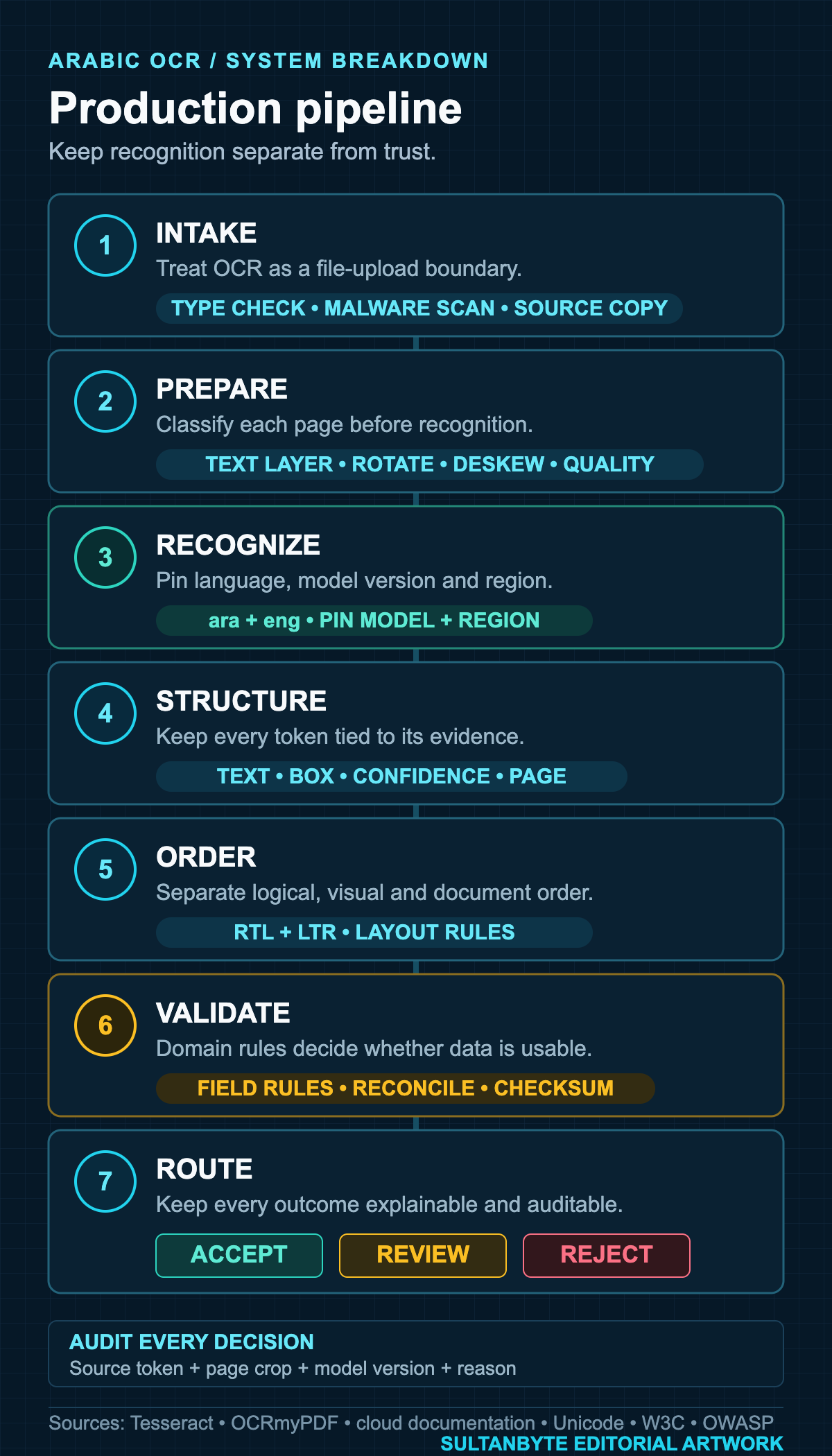
The OCR engine is one part of the system. The harder work is deciding what to scan, preserving the source, reconstructing reading order, validating fields and routing uncertain results before they reach another system.
Start by classifying the document
Do not rasterize every PDF and OCR it again. A PDF may already contain a usable text layer, an image-only scan, or a mixture of both across its pages. Reprocessing good text can replace exact characters with guesses and make search worse.
Classify each page before recognition:
- Extract the existing text layer and measure whether it contains meaningful text.
- Render a page image and check orientation, skew, blur, glare and crop loss.
- Record the languages and scripts expected for that document type.
- Send only the pages that need recognition to the OCR engine.
- Keep the original file and page images immutable.
OCRmyPDF's cookbook makes a useful distinction: rotation fixes a page at the wrong cardinal angle, while deskew corrects a page that is only slightly off horizontal. Those should be separate, observable preprocessing steps. A rotation guess should not silently overwrite the source.
This page-level classifier also gives the product an honest failure state. A cropped identity document, a blurred delivery note or a password-protected PDF should be rejected or sent for recapture instead of producing authoritative-looking nonsense.
Pin language policy per document type
Arabic support is not a checkbox shared by every OCR product.
Open-source Tesseract requires explicit language data. Its command-line documentation defaults to English unless another language is selected, supports combinations such as ara+eng, and warns that language order can change output and processing time. The project also publishes an Arabic trained-data file. That proves a model is available. It says nothing about how well the model will read your invoices, handwriting or camera images.
Cloud support differs by product and feature. Google Cloud Vision lists Arabic as a supported language that it prioritizes and regularly evaluates. Google documents layout extraction, deskewing, rotation correction and image-quality signals for Enterprise Document OCR. Azure Document Intelligence v4.0 lists Arabic for printed text in its Read model.
The negative case matters too. Amazon Textract's current limits page lists English, French, German, Italian, Portuguese and Spanish for text detection, and says handwriting recognition is English-only. Arabic is not on that list. An AWS-hosted application can still call another OCR service or run its own model, but its architecture should not assume that every managed document API in the same cloud supports Arabic.
Treat those pages as support boundaries, not scorecards. Before choosing an engine, build a fixture set from your documents and pin the exact API version, model version, region and language hints used in the test.
Keep text, geometry and confidence together
A plain string is the least useful OCR result. Store the recognized text with page number, polygon or bounding box, block and line relationships, confidence, engine version and preprocessing decisions.
Tesseract's documented hOCR and TSV outputs include word boxes and confidence values. Managed document APIs expose similar layout structures. Keep that geometry even if the first use case only needs one field. It makes three later tasks possible:
- showing reviewers exactly where a value came from;
- rebuilding reading order without rerunning recognition;
- comparing a corrected field with the original OCR token during evaluation.
Do not turn confidence into a universal pass threshold. A 0.92 score for an invoice total and the same score for a person's surname carry different risk. Engines also calibrate confidence differently. Use thresholds per field and model version, backed by the fixture set.
Reconstruct reading order outside the OCR engine
Arabic adds a trap: logical text order, visual order and document reading order are not the same thing.
The Unicode Bidirectional Algorithm determines how stored characters are reordered for display. The W3C Arabic and Persian Layout Requirements notes that Arabic runs right-to-left while numbers and normally left-to-right scripts run left-to-right. That explains display behaviour inside a line. It does not tell an OCR pipeline whether the right-hand invoice column should be read before a left-hand English column, or whether a table row belongs to the label above it.
Preserve logical Unicode strings from the engine. Do not reverse Arabic characters to make console output look right. Build document reading order from geometry, detected blocks and a template or layout model. Then render each string with normal bidi-aware UI controls.
Bilingual documents need an explicit rule. A practical token record is:
type OcrToken = {
  text: string;
  page: number;
  polygon: number[];
  confidence: number;
  script: "Arab" | "Latn" | "mixed" | "other";
};
Group tokens into lines by geometry, classify the dominant script, and order blocks according to the document template. Keep mixed runs intact. Product codes, IBANs, dates and amounts often contain Latin letters or digits inside an Arabic context.
Validate fields as data, not prose
OCR produces observations. Your domain model decides whether those observations are acceptable.
An invoice total should reconcile with line items and tax. An IBAN should pass its checksum. A date should be parsed against the expected calendar and locale. An identity number should match the documented format for that document type. A supplier name should be compared with a controlled vendor record, while preserving the OCR value for audit.
Do not "correct" every Arabic variant globally. A search key may remove diacritics or map selected letter variants; a legal name field may need the exact printed spelling. Reuse the field-contract approach from SultanByte's guide to Arabic text normalization and security, but keep OCR output as a separate raw observation.
A useful field record contains:
type ExtractedField<T> = {
  rawText: string;
  parsedValue?: T;
  sourceTokens: string[];
  validation: "valid" | "invalid" | "review";
  reasons: string[];
  modelVersion: string;
};
The reasons array matters. "Low confidence" is less useful than "invoice total does not equal subtotal plus VAT" or "Arabic and Latin digits were mixed in an ID field." Reviewers need a concrete reason to look at a page.
Put document uploads behind a security boundary
An OCR endpoint is also a file-upload endpoint. It receives complex files and sends them through parsers, image libraries and model runtimes.
The OWASP File Upload Cheat Sheet recommends layered controls: allowlisted extensions, file-type checks that do not trust the Content-Type header alone, generated filenames, size limits, storage outside the webroot, malware scanning or sandboxing where available, and content disarm and reconstruction for formats such as PDF when appropriate.
Run OCR workers with no public ingress and minimal storage permissions. Put temporary files in an isolated bucket or volume with a short retention policy. Do not write full identity documents or invoice text into ordinary application logs. Log document IDs, page numbers, model versions, timings and reason codes instead.
Data location needs an explicit decision too. A vendor may support Arabic without offering the processing region, retention terms or administrative controls required by the workload. Check those separately for Saudi Arabia, the UAE and every other market in scope. "Arabic supported" does not answer where the document goes.
Evaluate the pipeline with field-level tests
Character error rate is useful for model work, but product acceptance should follow the field that can fail.
Build fixtures across:
- native PDFs, scans and phone photos;
- 90-degree rotation, small skew, blur, shadow, glare and cropped edges;
- Arabic-only, English-only and bilingual pages;
- Arabic-Indic and European digits;
- tables, stamps, signatures and handwriting;
- common fonts, dot patterns, diacritics and low-resolution text;
- real document templates from each supported issuer.
Measure exact match for IDs, dates, amounts and codes. Measure normalized match only where the field contract permits normalization. For long text, track character or word error rate, but also test reading order and whether every token maps back to the correct page region.
Keep the test set versioned and split by document type. A single average can hide a complete failure on one issuer's form. When a model or preprocessing rule changes, compare old and new results on the same fixtures before switching traffic.
Design for review before automation
The final architecture should have at least three outcomes: accept, review and reject.
Accept a field only when recognition, validation and business rules agree. Send it to review when the document is readable but the field is uncertain or inconsistent. Reject the page when the source is unusable, unsupported or unsafe to process.
The review screen should show the page crop beside the extracted value, preserve bidirectional rendering, explain the routing reason and record the correction. Those corrections can improve fixtures and rules. They should not disappear into an editable text box with no audit trail.
A reliable Arabic OCR system is a document pipeline with an OCR engine inside it. The model reads pixels. The product still has to decide what the text means, whether it is safe to trust, and what happens when it is wrong.
Sources: Tesseract and OCRmyPDF documentation; Google Cloud Vision and Document AI documentation; Microsoft Azure Document Intelligence documentation; Amazon Textract limits; Unicode UAX #9; W3C Arabic & Persian Layout Requirements; OWASP File Upload Cheat Sheet. Graphic: SultanByte editorial artwork.
Cover credit: SultanByte editorial artwork based on the cited technical documentation and standards.
About the author
- I have lead the Engineering for multiple startups in UAE. I also have my own agency qualascend.com.
Comments
Join the discussionNo comments yet. Be the first to comment.
Builder Guides
Practical architecture, engineering, security and implementation guides for teams building technology in MENA.