Arabic-English data tables: headers, sorting and access
A practical guide to semantic tables, RTL layout, accessible sorting and narrow-screen access for bilingual MENA portals.
An operations user opens an Arabic supplier list, finds a reference number and checks the status beside it. On a phone, the same list becomes a set of cards. With a screen reader, it becomes a sequence of headers and values. Those views need to describe the same records, even when their layouts differ.
For teams building bilingual procurement, logistics or customer-service portals in MENA, a data table is worth treating as a product component with its own acceptance tests. Translating column headings is not enough. Users must still know which record an action affects, what the current sort means and how to reach information outside the visible area.
This guide proposes a review workflow for Arabic-English tables. It covers presentation and interaction, not backend pagination or bulk-action execution. It is engineering guidance rather than a claim of accessibility or regulatory conformance in any country.
Cover: original SultanByte artwork showing shared record identities beneath Arabic and English table views.
Choose a table before choosing a grid
Start with the task. If users mostly read rows, follow links and occasionally activate a button, prefer a native HTML table. The WAI-ARIA table pattern explicitly allows interactive controls inside a table; those controls remain individual stops in the page's tab sequence. A row containing an action menu does not automatically need role="grid".
A spreadsheet-like editor is a different commitment. The ARIA grid pattern describes a composite widget with managed focus and directional keyboard navigation. Adding the role does not implement those behaviours. The team must decide how users enter a cell, operate its controls and leave the grid.
For a supplier-review screen, begin with a table and a separate detail page. Choose a grid only when the working task benefits from cell-level navigation or frequent editing and the team can maintain that interaction model. Record the choice in the component specification so a library upgrade does not quietly change keyboard behaviour.
Keep country and language settings separate in that specification. A Saudi deployment and a UAE deployment may share the component without sharing the same fields or business terminology. Test the column labels and action names agreed for each customer; do not assume that one Arabic translation settles both deployments.
Give each value its headers
The W3C tables tutorial explains why visual alignment is insufficient: assistive technology needs programmatic relationships between header cells and data cells. Use a caption to identify the table, column headers for field names and a row header where one cell identifies the record.
The HTML table model defines scope for header associations and headers for explicit references to header-cell IDs. A simple table usually needs a simpler structure than a report with several levels of grouped headings. Avoid building the latter by stacking bold labels above unrelated cells.
Here is a small Arabic markup fixture. The supplier name and reference are synthetic; the example demonstrates structure, not a complete application:
<table lang="ar" dir="rtl">
  <caption>طلبات الموردين التجريبية</caption>
  <thead>
    <tr>
      <th scope="col">المرجع</th>
      <th scope="col">المورد</th>
      <th scope="col">الحالة</th>
    </tr>
  </thead>
  <tbody>
    <tr>
      <th scope="row">
        <bdi dir="ltr">REQ-104</bdi>
      </th>
      <td><bdi>شركة الاختبار</bdi></td>
      <td>قيد المراجعة</td>
    </tr>
  </tbody>
</table>
For a real component, the caption should explain the active dataset rather than merely say "Results." Put changing filter context nearby and make it available to nonvisual users. An empty result needs an explanation and a route to adjust filters, not an unexplained blank rectangle.
When a row has an "Open" link, give it a meaningful accessible name that includes the record reference. Keep the visible wording in that name. Avoid making the entire row a mouse-only click target while leaving keyboard users with no equivalent link.
Separate RTL layout from record order
W3C's structural direction guidance recommends dir="rtl" on the root element for an RTL document. Direction also affects table column layout. Keep the source columns in their logical order and test the resulting Arabic view; reversing the array as well as applying RTL can undo the intended arrangement.
That is separate from sorting the rows. A language switch should not accidentally reverse a newest-first list. If your product deliberately uses locale-specific alphabetical sorting, describe that policy and preserve record identities when the order changes. SultanByte's pagination guide covers the backend ordering and traversal problem; the table should display the order it receives without inventing another one.
Inside a cell, treat references and names as text with their own directional requirements. The Unicode Bidirectional Algorithm distinguishes logical character order from display order. Do not reverse stored strings to make an identifier look right.
For dynamically inserted names, the HTML bdi element isolates text from its surroundings. Use an explicit LTR direction for a reference whose format is known to be LTR. This does not validate the reference or sanitize untrusted HTML; render ordinary values as text through the framework's escaping mechanism.
Keep the copied identifier tied to the stored value. Include parentheses, slashes and a mixed Arabic-English supplier name in the test fixture, then check the visible value and the copied result separately.
Make sorting an explicit operation
The APG sortable-table example places buttons inside sortable column headers and sets aria-sort on the currently sorted header. It labels the example as unsuitable for direct production use; treat it as a pattern to implement and test, not a finished component.
For a single-column sort, expose one current sorted header and update its state when the displayed order changes. A decorative arrow without a usable button is not an interaction. Do not rely on colour alone to distinguish ascending, descending and unsorted states.
For server-side sorting, treat the request and its completed result separately. Keep the last successful order visible while the request is pending, or clearly identify the loading state. If the request fails, do not leave a new sort indicator over the old row order. Retain focus on the sorting control where practical, and provide a concise outcome message rather than repeatedly announcing the entire table.
Define what each sortable field means. Sort quantities using their underlying numeric values, not formatted display strings. A status order such as "needs attention first" is a product rule, not necessarily alphabetical order. Give the rule a name a reviewer can understand.
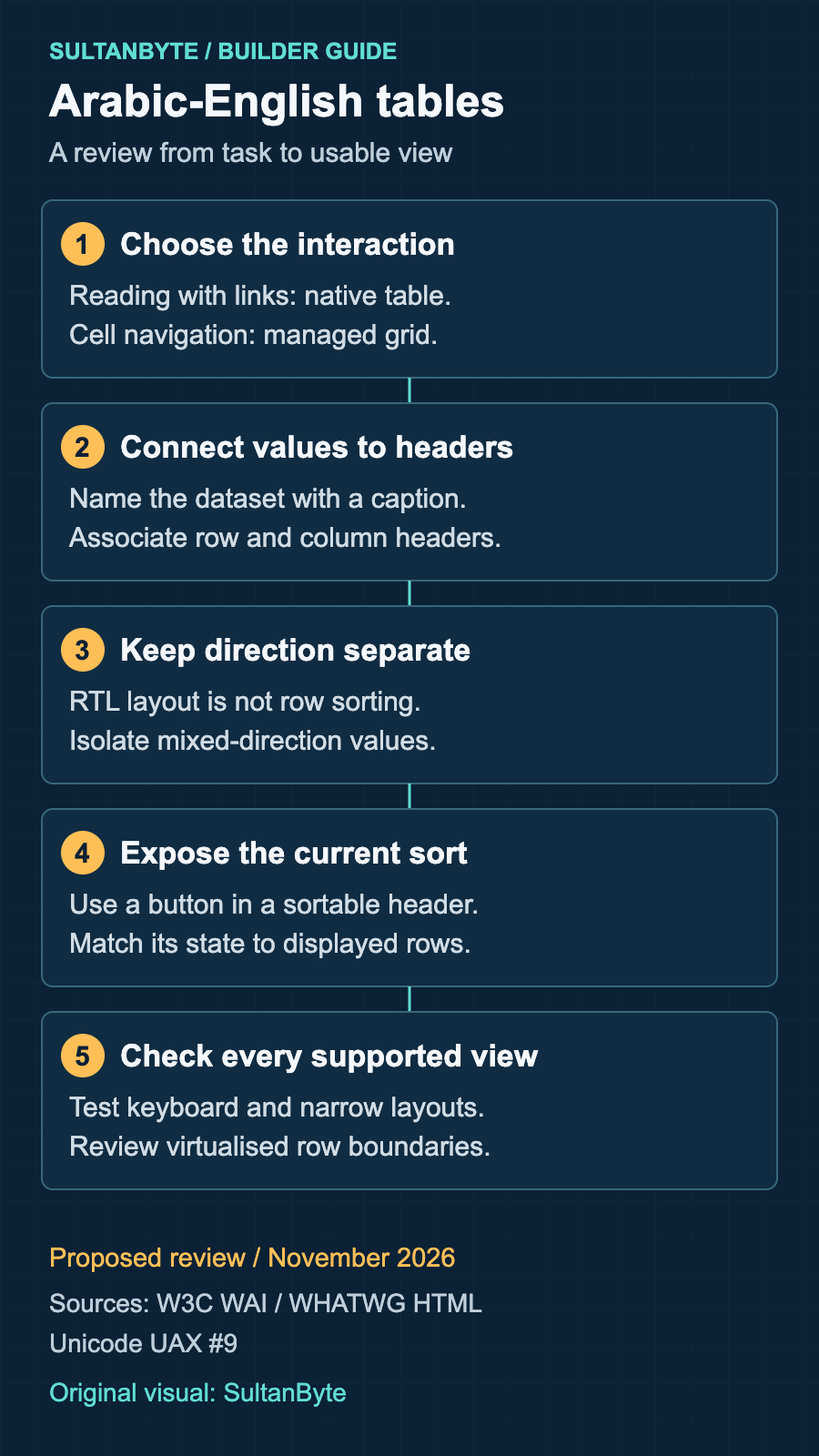
Original infographic: SultanByte. Proposed review workflow informed by W3C WAI, WHATWG HTML and Unicode UAX #9, November 2026. It presents design guidance, not measured results.
Keep narrow layouts usable without shrinking the text
WCAG's reflow guidance permits two-dimensional scrolling for parts whose meaning or use requires it, including data tables. Individual cells must still reflow unless their content independently needs two-dimensional layout. Unrelated page content does not inherit the table's exception.
For a comparison table, consider a contained horizontal scroll area with visible overflow cues. Make the area keyboard reachable when needed, give it a useful accessible name, and test actual scrolling in supported browsers. Keep filters, explanations and pagination outside the wide region so they can reflow normally.
For a task that only needs one record at a time, a compact summary with a detail view may work better. If you provide a card layout, include explicit field labels and the same record-specific actions. Do not leave a second invisible set of buttons in the tab sequence. Verify that the active view exposes the information needed to complete the task, rather than assuming that matching colours and spacing prove equivalence.
Long supplier names should wrap or have a discoverable full-value view. A mouse-only tooltip is not a satisfactory way to recover a truncated reference. Test enlarged text with sticky headers and frozen columns enabled: these conveniences must not cover the field or action receiving focus.
Treat virtualisation as a separate release decision
If the application renders only a window of a larger dataset, review what assistive technology can discover. APG's grid and table properties guidance explains row and column counts and indices for structures where not all rows or columns are present. Incorrect or inconsistent indices can break navigation; these attributes are not decorative metadata.
Do not add a grand total to a paginated table without deciding what that table represents. A page of results and a virtual window into one logical table are different designs. Document the intended model, including header rows, before implementing indices.
For a modest business list, prefer conventional pagination until measured performance or the user's task justifies virtualisation. If virtualisation is necessary, test navigation across the rendered boundary and what happens when a focused row leaves the window. A faster paint is not sufficient if the user loses their place.
Review the component with a concrete task
Use a harmless fixture containing a long Arabic name, an English name, mixed punctuation, duplicate display names with distinct references, and an empty result. Ask a reviewer to find a specified record, change the sort and open that record's details.
Repeat the task in both languages using a keyboard, then with the screen-reader and browser combinations your team supports. Check that the announced headers describe the intended cell, sorting preserves the record identities, and focus survives updates. Repeat at a narrow viewport and with enlarged text. These are proposed acceptance tests, not claims that one automated scanner can certify the result.
For buyers evaluating a portal, request this demonstration with your own non-sensitive fixture rather than accepting an "RTL supported" label. For engineering teams, keep the fixture and expected outcomes beside the component tests. Release the table when a user can identify the right record and complete the same task through every supported view, not merely when its Arabic screenshot looks aligned.
About the author
- I have lead the Engineering for multiple startups in UAE. I also have my own agency qualascend.com.
Comments
Join the discussionNo comments yet. Be the first to comment.
Builder Guides
Practical architecture, engineering, security and implementation guides for teams building technology in MENA.